
Stop losing jobswhile you're doing jobs.
Lead Mule catches your leads, follows up, and helps you get paid.
14 days free. No card. No BS.
Start to finish
From “they called” to “they paid.”
They call.
You can't answer — you're working. Lead Mule picks up, listens, and texts them back so they know you got it.
You send the bid.
Scope and a price. That's the whole form. It goes out as a text with a link.
Cedar removal + haul off
$1,450
They tap Accept.
No printing. No callback. No “let me get back to you.” Your phone buzzes the second they say yes.
Tapped from the couch at 9:47pm
They pay.
Mark the job complete. Lead Mule sends the bill and your payment link — Venmo, Zelle, PayPal, whatever you use.
Paid · 11 minutes later
What it isn't
Not another CRM.
You don't need another giant system telling you how to run your business. You need to know six things.
- Who wants a job?
- Did they hear back from me?
- Did I send the bid?
- Did they accept?
- Did I finish the job?
- Did they pay?
That's Lead Mule.
The reality
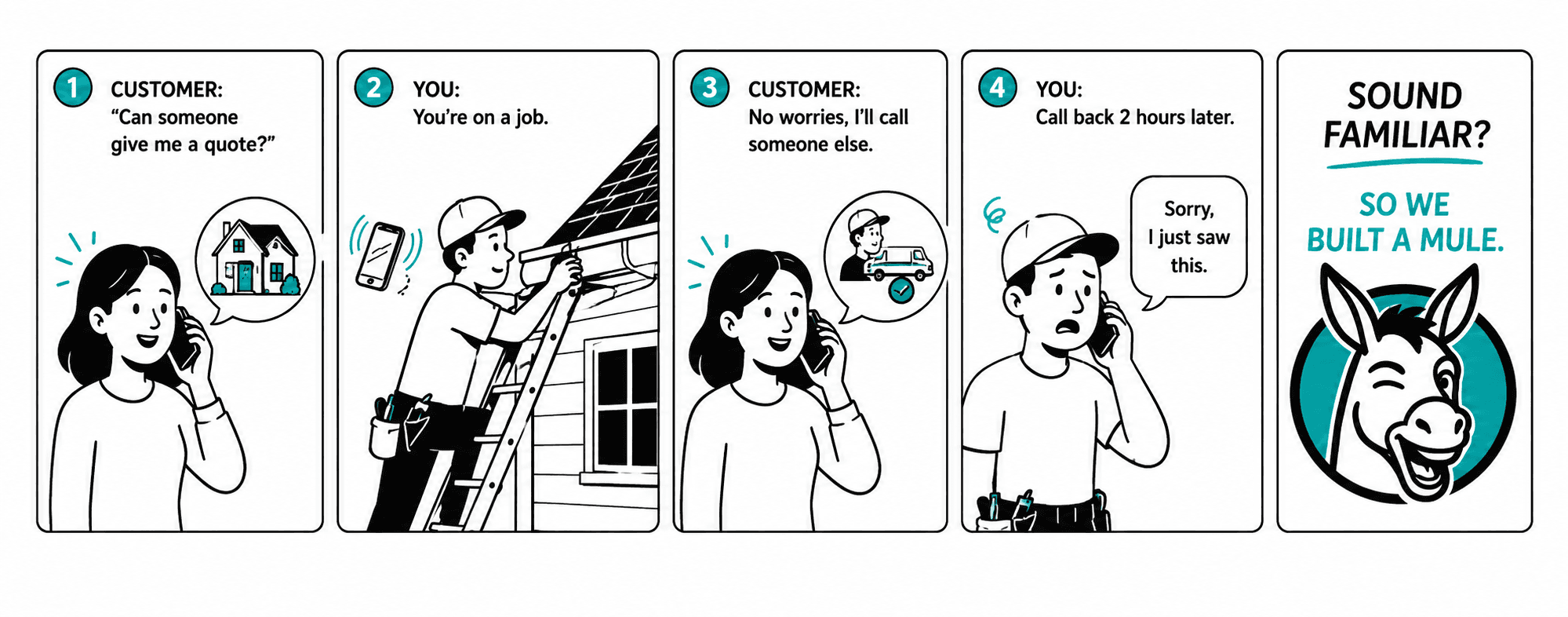
Every missed call feels like this.
The pain
You're not ignoring your leads.
You're working.
- You're on a roof.
- Under a sink.
- Behind the wheel.
- With another customer.
Your customer doesn't know that.
They just know nobody answered.
Lead Mule catches the lead before they call the next guy.
Every lead. One place.
Stop hunting for leads. They're all right here.
No more digging through your voicemail, your texts, your inbox and your Facebook to work out who still needs you.
Snap a photo of a message and drop it in — Lead Mule pulls the lead out of the screenshot. Or type one in by hand.
What it does
Four things. Done well.

It catches.
Calls, voicemails, texts and emails. One place.

It replies.
The customer hears from you while you're still working.

It follows up.
If they go quiet, one polite nudge. Then it leaves them alone.

It gets you paid.
Job done? Lead Mule sends the bill and your payment links.
“Wait — you're forwarding my phone?”
Your phone still works exactly like it always has.
- 1A customer calls your number. The same one on your truck.
- 2Your phone rings first.
- 3If you answer, nothing changes. Lead Mule stays out of it.
- 4If you don't, your carrier passes the call to Lead Mule.
- 5Lead Mule takes the voicemail, reads it, and works out whether it's a job or something personal.
It's one code you dial once. Your number never changes.
The part nobody else does
And no, Lead Mule won't text your wife.
It reads the voicemail first. Work call? We reply. Personal call? We leave it alone.
Sounds like work
“I got your name from a neighbor — I need a quote on taking down a cedar in the backyard.”
Answered in under a minute. On your board as a lead.
Sounds personal
“Hey, it's me. Call me back when you get a sec — love you.”
Nothing. No auto-text, ever. It comes to you and stops there.
Want it guaranteed? Add your wife's number, the school, your supplier. Those calls skip the sorting entirely. We don't keep the numbers — just a scrambled version we can match against, and the last four so you know which is which.
The bid
Stop waiting for “I'll get back to you.”
Send the bid. They tap Accept. You get the notification.
Because the easier you make “yes,” the more often you get one.
Getting paid
Getting paid shouldn't be another thing on your list.
You finish the job.
Mark it complete.
If the money hasn't landed, Lead Mule sends the bill and your payment link.
Venmo. Zelle. PayPal. Whatever you use.
One reminder. Then it's done.
You did the work. You shouldn't have to be the guy who asks twice.
How it fits your day
You don't need another app to babysit.
Lead Mule works in the background and taps you when you actually need to do something.
- A new lead comes in.
- A bid gets accepted.
- Something needs you today.
Otherwise it stays quiet and keeps things moving. Nothing between 10pm and 7am unless it looks like an emergency.
The actual product
See Lead Mule in action.
Watch one lead go all the way through.
From a call you couldn't answer to money in your account.
mobile
Maria L.
(360) 555-0142
Phone's in the truck. You don't hear it.
1 / 10
Don't take our word for it
Play with Lead Mule.
We loaded an account with fake customers so you can see exactly what happens. No card, nothing to connect.
Waiting for you inside
Real product. Fake customers. It can't text anybody.
Setup
Set it up. Then go back to work.
Forward your unanswered calls.
One code you dial once. Your phone still rings normally — this only kicks in when you can't pick up.
Tell the Mule who not to bother.
Your wife, the kids' school, your suppliers. Those calls never get an auto-text.
Connect your inbox — if you want.
Gmail, Outlook, whatever you use. Read-only. Skip it and everything else still works.
The Mule handles the rest.
You won't have to check whether it worked. The first call that reaches us, we text and email you that you're live.
The expensive part
You're already paying for the leads.
Getting the phone to ring is the expensive part. Don't lose the job after that.
Pricing
$29 a month. Everything included.
No complicated plans. No feature gates. No “contact sales.”

One missed lead costs more than a year of Lead Mule.

Lead Mule
Everything, one price.
- ✓Every call, text and lead email in one place
- ✓Auto-text reply with your name on every missed call
- ✓One follow-up on the message, the quote, and the bill
- ✓Bids your customer accepts with one tap
- ✓Payment links — Venmo, Zelle, PayPal, Cash App
- ✓Cancel any time. Your data is yours.
14 days free. No card. Cancel whenever.
Who it's for
If your office is a truck, this is for you.
Anyone whose hands are usually too busy to answer the phone.
Built by a contractor's wife who got tired of hearing “I missed another call” every night.
Common questions
Straight answers.
Does my phone number change?+
No. Your customers keep calling the same number — the one on your truck.
What happens if I answer the call?+
Nothing. Lead Mule stays out of it.
What happens if I miss it?+
Your carrier forwards the unanswered call to Lead Mule. We take the voicemail, read it, and if it's a work lead, text the customer back with your name on it.
What if it's my wife?+
We don't text her. Lead Mule reads the voicemail before sending anything. You can also add trusted numbers that skip the sorting entirely.
What if they hang up without leaving a message?+
Then there's nothing to read, so nothing goes out. You'll still see the missed call on your phone like always.
What if my phone dies or I've got no signal?+
Still works. The forwarding happens at the phone company, not on your handset — so the call reaches Lead Mule even when your phone is dead, off, or out of range.
Does Lead Mule read my email?+
Only the inboxes you connect, and only to spot real leads — Angi, Thumbtack, Google, or a customer writing you directly. Receipts, newsletters and vendor pitches get skipped. Read-only. We never send from your account.
Is Lead Mule a CRM?+
Nope. That's kind of the point.
How do I get paid?+
You connect the payment links you already use — Venmo, Zelle, PayPal, Cash App. Lead Mule sends them to the customer. We never touch the money.
Will Lead Mule keep texting my customers?+
No. The Mule isn't a stalker. One nudge on the message, one on the quote, one on the bill — and the second they reply, it stops.
Will it wake me up at 11pm?+
No. Quiet hours run 10pm–7am, plus weekends if you want them. Leads still get caught and answered in real time; your phone just stays quiet until morning.
What carriers does it work with?+
All the major US carriers and most of the smaller ones. Call forwarding has been a standard phone feature for forty years.
How long is the trial? Do I need a card?+
14 days, no card to start. We'll ask on day 12 if you want to keep going.
Can I get my data out?+
Yes. Settings → Export Data. Everything in CSV, any time.

Go do the job. Let the Mule catch the leads.
Start your 14-day free trial. No card. No BS.
Hitch up my mule →